Goals & Metrics
Goals & Metrics is currently in alpha. We'd love your feedback while we refine the experience and fill in the missing pieces.
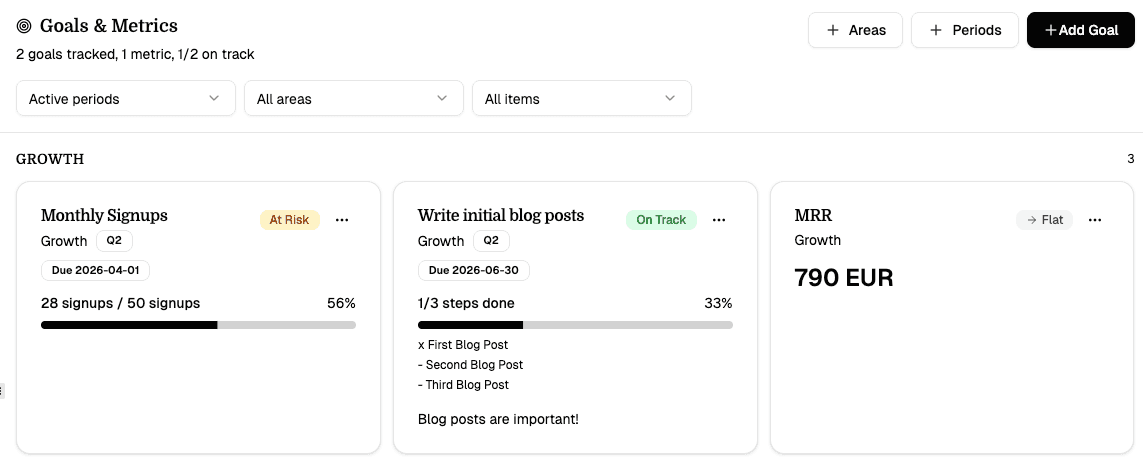
Goals & Metrics is Q's special page for tracking outcomes. It gives you one place to define what success means, record progress manually, and preserve historical targets across archived periods.
Use it when you want to answer questions like:
- What are the few outcomes that matter right now?
- Are we improving key metrics or just shipping work?
- Which goals belong to growth, revenue, product, or financial health?
- What changed this quarter compared to the last one?
Core Concepts
Areas
Areas are durable buckets for grouping goals. Q starts with a few built-in areas:
- Growth
- Revenue
- Product
- Financial
You can add more custom areas if your project needs them.
Periods
Periods are optional OKR-like cycles such as Q2 2026, Launch Month, or Post-beta.
Important rules:
- Goals can live inside a period or exist without one.
- Periods are archived, not deleted.
- Archived periods stay available so Q and external tools can reference historical targets later.
Goal Types
Goals & Metrics supports three goal types plus one special metric mode:
| Type | Use it for | Example |
|---|---|---|
| Numeric goal | A measurable target | 100 signups, $10k MRR, 20% activation |
| Boolean goal | A yes/no outcome | Launch on Product Hunt |
| Milestone goal | A checklist-style outcome | Prepare beta launch |
| Metric | A tracked numeric value without a target | Weekly active users, MRR, site traffic |
Goals vs Metrics
This distinction matters:
- A goal has a target and gets a status badge
- A metric has no target and gets no status badge
Instead of status, metrics show a trend:
- Up
- Down
- Flat
This keeps targetless tracking from looking artificially "behind" or "not started."
Status Calculation
Q uses two modes for goal status.
Deadline-aware mode
If a goal has a deadline, Q compares actual progress to expected pace over time.
This means:
completedwhen progress reaches 100%on_trackwhen progress is at or above expected paceat_riskwhen progress is slightly behind pacebehindwhen progress is materially behind pace
Fallback mode
If no deadline exists, Q falls back to static thresholds:
completedat 100%+on_trackat 60%+at_riskat 30%+behindbelow 30%
Boolean goals are simpler:
- completed if checked
- not started otherwise
Working With Numeric Goals
Numeric goals track:
- current value
- optional target value
- unit
- optional deadline
Examples:
42 / 100 signups18 / 25 paid users7% / 12% conversion
If you remove the target, the item becomes a metric.
Working With Milestone Goals
Milestone goals are useful when the result is best represented as a checklist rather than a single number.
Examples:
- Launch checklist
- Security review
- Beta readiness
Progress is calculated as completed steps / total steps.
Filters
The toolbar supports filtering by:
- period
- area
- kind (
all,goals,metrics)
This makes it easy to focus on:
- only current-period goals
- only growth-related outcomes
- only metrics without targets
Manual Updates
For now, values are updated manually:
- numeric goals: set the latest current value
- boolean goals: mark done or undone
- milestone goals: check completed steps
Every update is added to the page history data so trends can be derived for metrics.
Future Webhooks
The current version is manual-first, but the data model is prepared for later webhook-based updates from systems like:
- analytics tools
- billing systems
- custom backend events
That future integration is meant to update values automatically while keeping the same Goals & Metrics UI.
Best Practices
- Keep the number of active goals small.
- Separate goals from metrics on purpose.
- Use periods when you want a time-boxed cycle.
- Leave some goals outside periods if they are evergreen.
- Archive periods instead of deleting them.
- Prefer milestone goals when success depends on several named steps.
Related Features
- Mission Boards for execution
- Growth Lab for experiments and channel learning
- Page Manager for adding and managing the page